

Our recent webinar UAD 3.6: Your Roadmap to November made it clear that the new Uniform Appraisal Dataset (UAD) 3.6 is a shift from a forms‑driven world to a data‑driven, dynamic reporting standard.
Hosted by Executive Vice President Mark Walser and featuring Freddie Mac’s Chief Appraiser, Scott Reuter, and Class Valuation SVP of Digital Operations, Nikkita Phanda, the session walked through what the new standard means for lenders, underwriters, and quality control (QC) leaders, and how it compares to the legacy UAD 2.6 form.
Below are the key comparisons that highlight how the new UAD standard differs from the legacy forms and changes the way appraisals are ordered, documented, and reviewed.
Legacy Forms vs. One Dynamic Report
UAD 2.6 appraisals have been organized around forms (1004, 1073, 1025, and so on) based on property type.
In UAD 3.6, that model disappears. Instead of choosing one form and making it work or being ineligible due to form restrictions, lenders will order appraisals based on the property’s configuration (units, ADUs, condo vs. SFR) and the scope of work (interior, exterior, desktop, hybrid, update, completion). The underlying technology then assembles a single dynamic report from the standardized data elements selected.
This shift in selecting property and assignment separately means more loans will be eligible for sale to government-sponsored enterprises (GSEs). It also means you’ll need to update your engagement letters, pricing grids, and workflows from the loan origination system (LOS) and appraisal management company (AMC) to reflect data‑driven requirements rather than specific forms.
Fixed Form Fields vs. Dynamic Sections
Under UAD 2.6, the Uniform Residential Appraisal Report (URAR) and related forms follow a fixed layout. Every report has the same sections, in the same order, whether or not they are truly relevant, and underwriters are trained to go to specific page numbers for the value conclusion, sales grid, photos, and conditions.
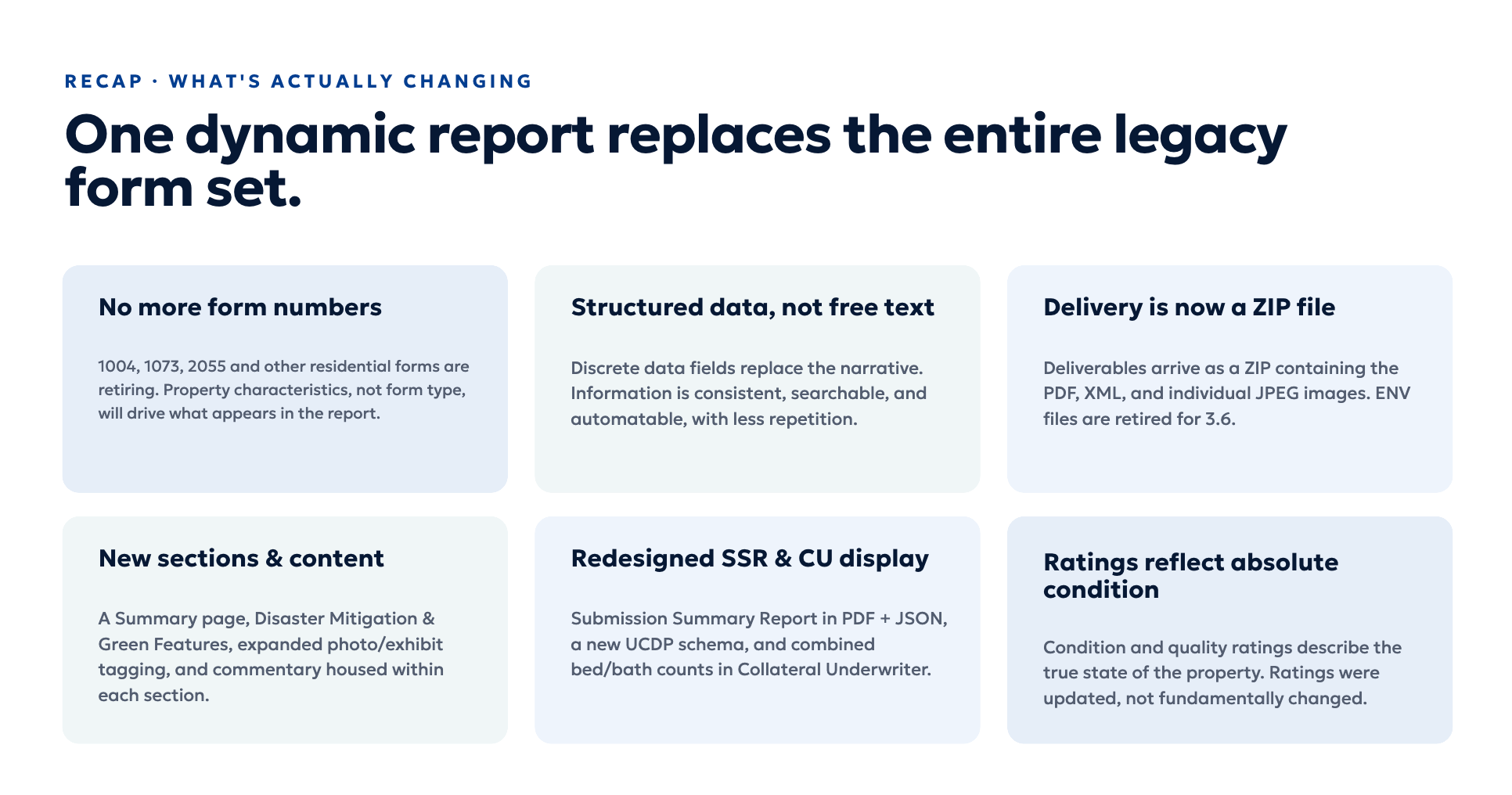
In UAD 3.6, the report itself is dynamic. Sections appear only when they apply to the subject property, assignment, or transaction, and photos and narratives can be contained in the sections they refer to rather than as exhibits. A missing section no longer automatically signals an omission; it may simply mean that data is not required or necessary.
Underwriting teams will need to shift from asking “What’s on page 3?” to “Which sections should apply to this file?” Update your checklists and quality control workflows to start with this question and to verify the relevant sections are present rather than assuming every appraisal follows the same page sequence.
Scattered Fields vs. A Summary Page
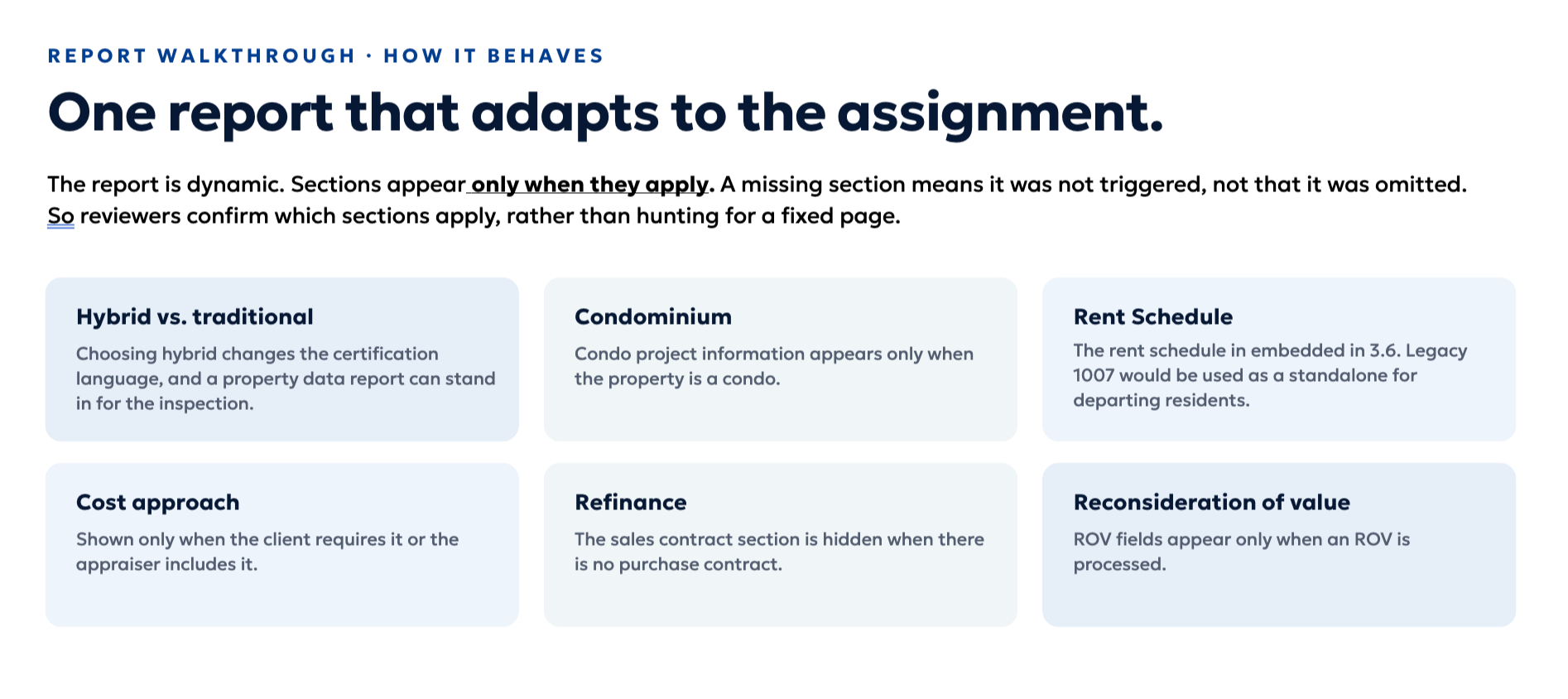
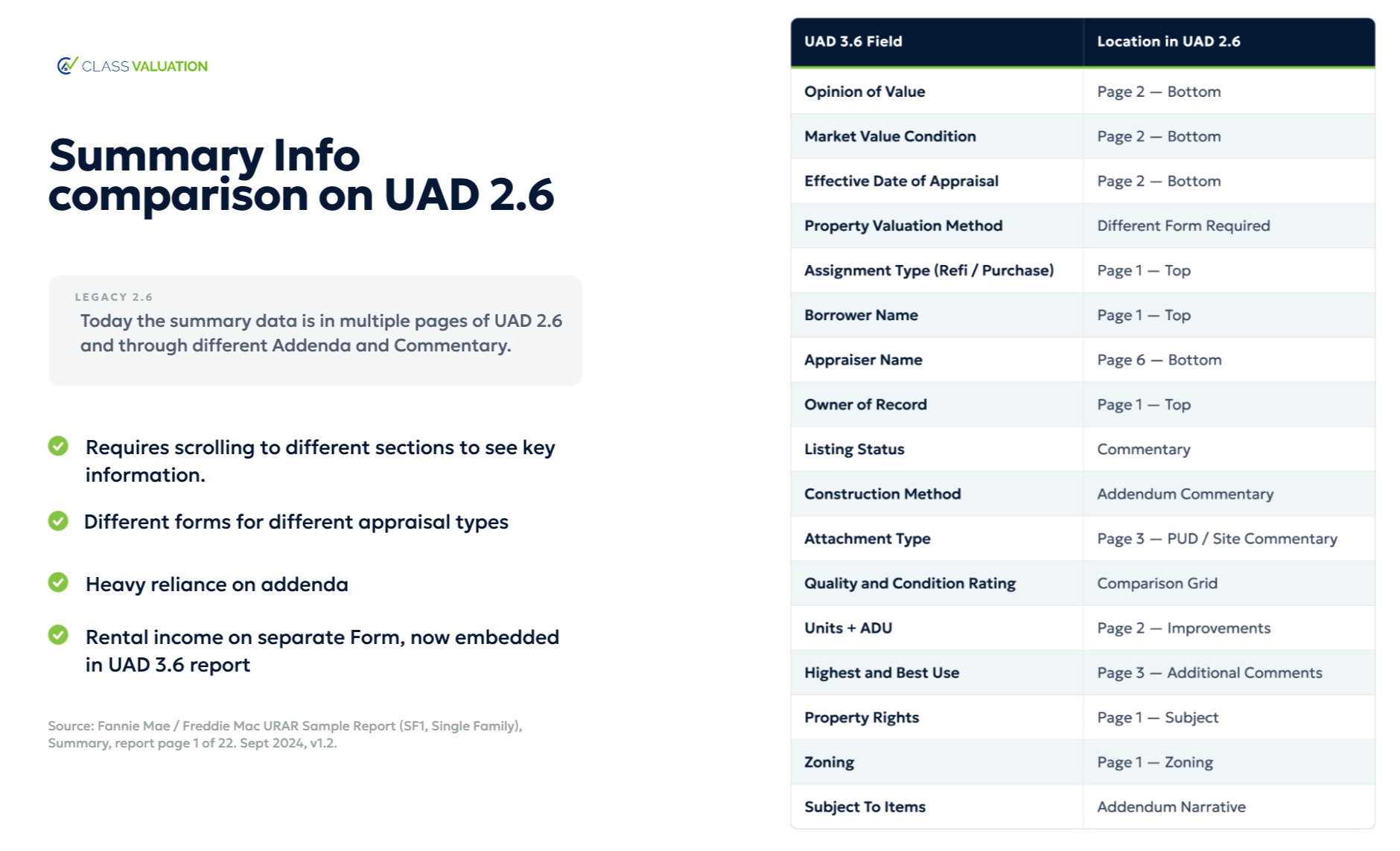
In the legacy URAR forms, critical information is scattered across multiple pages. The appraiser’s value conclusion sits at the bottom of page 2, key assignment details are split between page 1 and the certifications later in the form, and material defects or issues may be buried in interior and exterior comments or lost in long addenda.
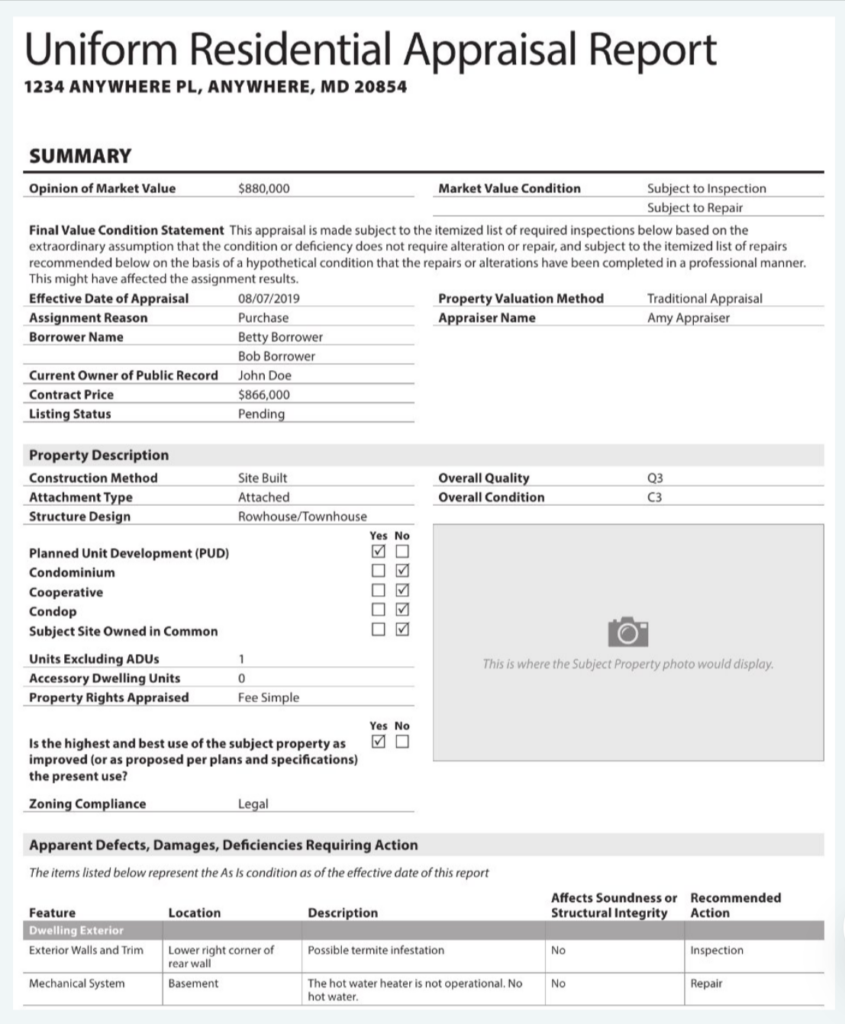
In UAD 3.6, the report instead opens with a summary page that consolidates the opinion of value, the market value condition, and the most important property facts. It also adds an apparent defects/damages/deficiencies table that surfaces potential concerns upfront so underwriters can see the risk profile at a glance and if any action is required.
The intent is not to replace underwriting judgment, but to summarize the property story immediately so underwriters can quickly understand risk before reading the rest of the file.

UAD 3.6 Field and Terminology Changes
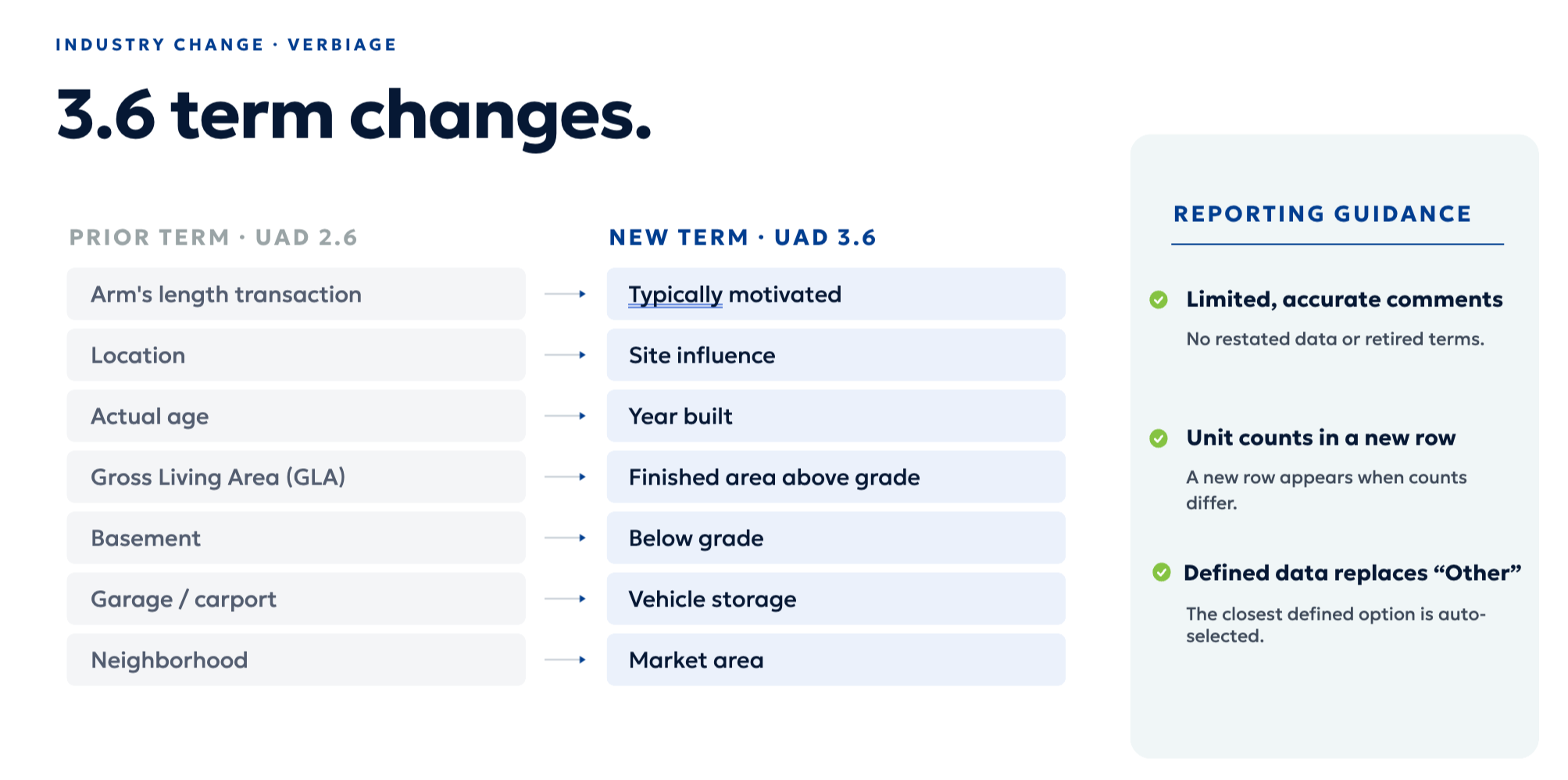
In the legacy UAD 2.6, many fields and labels reflect long‑standing real estate jargon, such as “arms‑length transaction,” “location,” “GLA,” and “garage” on the face of the report.
Under UAD 3.6, some of these familiar labels are changing to better align with the new data standard, ANSI measurement standards, and how the GSEs consume appraisal data. For example, “arm's length transaction” is represented as “typically motivated,” “location” translates to “site influenced,” and appraisers will report “year built” rather than a derived property age field. “Garage” is consolidated under “vehicle storage,” and “GLA” is replaced with “finished above‑grade area” broken out by level, with below‑grade area reported separately.
These changes will require some retraining of muscle memory. The underlying concepts are the same (quality, condition, motivation, and living area), but the labels and field structures on the page have. Updating checklists, job aids, and screen overlays to map familiar terms to their UAD 3.6 equivalents will help teams adapt quickly and avoid misinterpreting new terminology as new policy.
A Product Set: Legacy 2.6 Forms vs. Six 3.6 Products
Under UAD 2.6, different scopes of work are tied to different forms. Lenders think of a 1004 for traditional appraisals, a 1004D for both appraisal updates and completion reports, and a 1007 for rent schedules, often delivered as a separate form.
UAD 3.6 reorganizes this into a coherent product family built on a single data standard. There are six core products (traditional, desktop, hybrid, exterior-only, appraisal update, and completion report) all expressed through the same dynamic structure. The rent schedule is no longer a standalone 1007 in most situations; instead, it is embedded as a section within the 3.6 report, with the legacy 1007 reserved for limited use cases.
Operationally, this means lenders will need to order and track updates and completions as distinct products and train staff to look for rent schedule content inside the UAD 3.6 report rather than expecting a separate 1007 PDF.

Unstructured Grid and Addenda vs. Structured Grid and In‑Section Exhibits
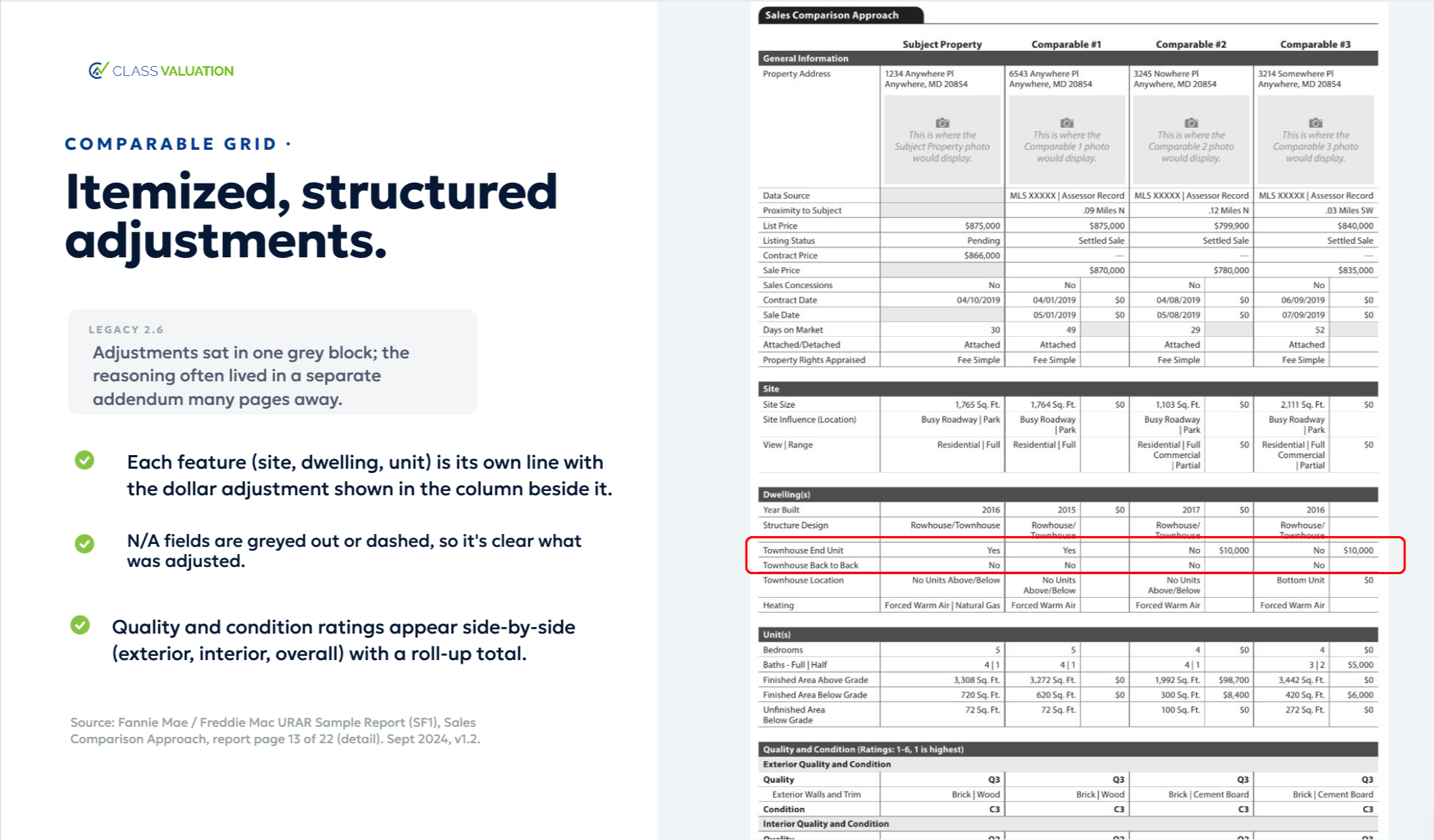
Under UAD 2.6, the sales grid often forces appraisers to roll multiple differences into a single lump‑sum adjustment, while additional explanation and photos live in a general addendum. Underwriters and QC reviewers spend time inferring which characteristics drove which adjustments and hunting for the right photo or comment.
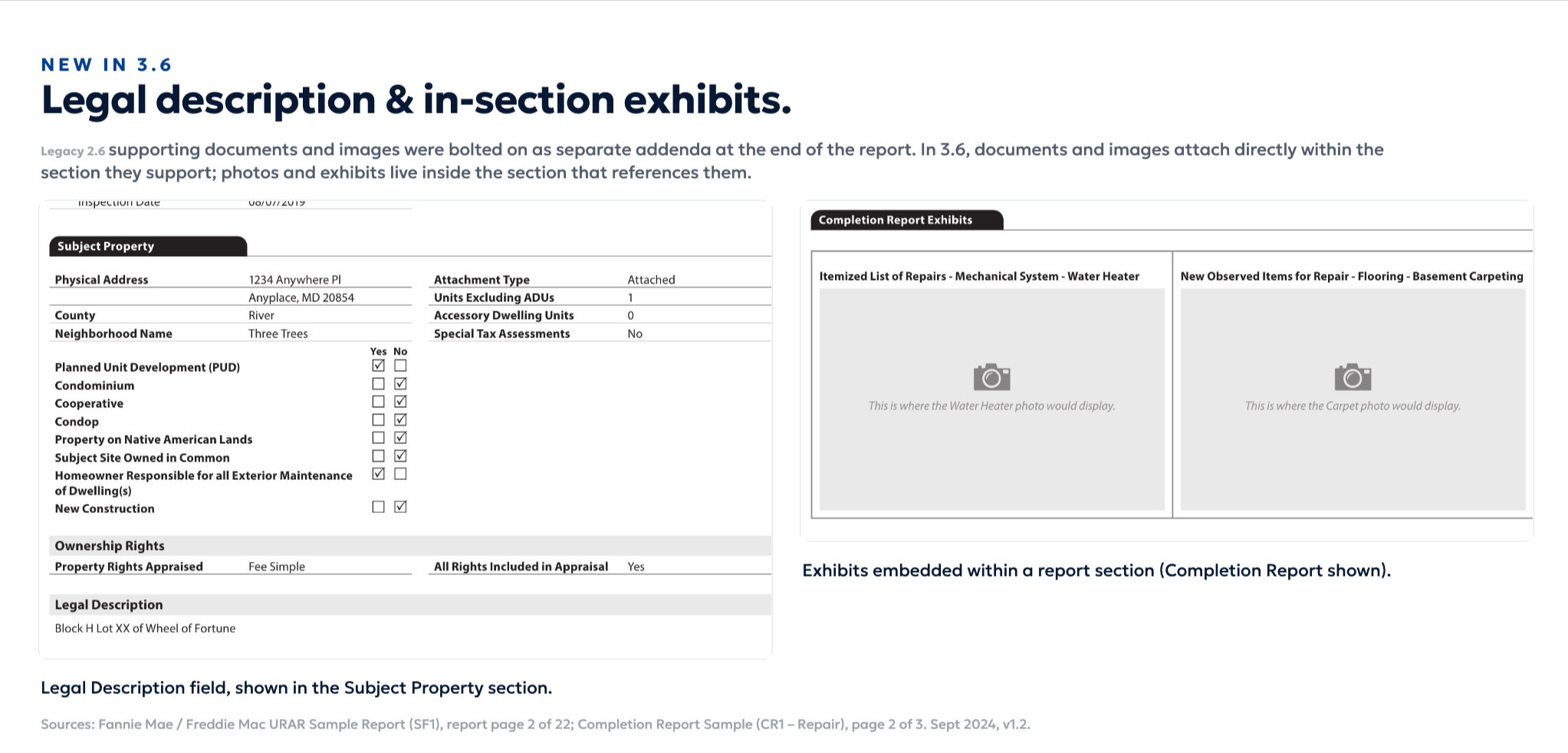
UAD 3.6 moves to a more structured, machine‑readable grid. Key property features have their own line items and adjustment fields, and non‑applicable items are clearly dashed or greyed out. Legal descriptions, photos, and narratives are placed in the sections they support, rather than as exhibits at the back of the report.
This reduces avoidable revision cycles because reviewers and analytics teams can see exactly which features drive which adjustments and review the linked commentary and images directly from the issues they describe.
While adapting to UAD 3.6 comes with a learning curve, it is temporary. Anticipate five or six reports before you feel comfortable. For more information and additional resources, check out our dedicated UAD 3.6 Resource Hub.
How Class Valuation can support your UAD 3.6 transition
Class Valuation can make your UAD 3.6 transition seamless. We offer dual system support for both UAD 2.6 and 3.6, so your workflows continue uninterrupted throughout the shift. In addition, our team has been working around-the-clock on integrations to handle the technical updates and system changes the new standard requires, acting as a true partner through every step of implementation.
But readiness goes beyond systems; it extends to our people. Through our partnership with McKissock, we're training both our staff appraisers and contract appraiser network on UAD 3.6, to ensure consistency and quality on every report you receive. Combined with expert guidance throughout your transition, Class Valuation is a partner who's prepared at every level of the appraisal process, not just at the point of order. Contact Class Valuation to speak with a representative and start your UAD 3.6 transition today.